Remove Background Online Free: No Sign Up, No Watermark, and HD Quality
Remove Background Online Free: No Sign Up, No Watermark, and HD Quality
The Struggle of Finding a Truly Free Background Remover
Dealing with blurry edges and low-resolution exports
Most 'free' tools are a trap. You upload your high-res photo, only to realize the 'free' version is a pixelated 360p thumbnail. If you see a 'Download HD' button locked behind a credit system, stop immediately; it is a waste of your time. I have seen countless people ruin their product photos by settling for these blurry exports. To avoid this, look for tools that explicitly mention 'Full Resolution' in their free tier before you even upload.
The frustration of hidden watermarks and mandatory sign-ups: Many sites wait until you have finished the work to tell you that you need an account or that a giant logo will be plastered over your image. If a site does not show a clear 'No Sign Up' policy, it is usually a sign that your data is the real price.
Why Most Online Tools Fail to Deliver HD Quality
Aggressive compression that destroys image detail
High-end AI processing is expensive, so free tools often cut corners by using aggressive compression. This results in a loss of fine detail, making your subject look flat and artificial. If your image has complex elements like hair, lace, or semi-transparent objects, most basic tools will simply fail, leaving you with jagged, 'chopped' edges. Honestly, if your subject is not a simple solid object, the success rate with generic tools is incredibly low.
Limited AI processing for complex backgrounds: Basic algorithms struggle with 'edge bleed' where the background color spills onto the subject. Always check the hair-line in the preview; if it looks like a solid block, the tool is not powerful enough for your needs.
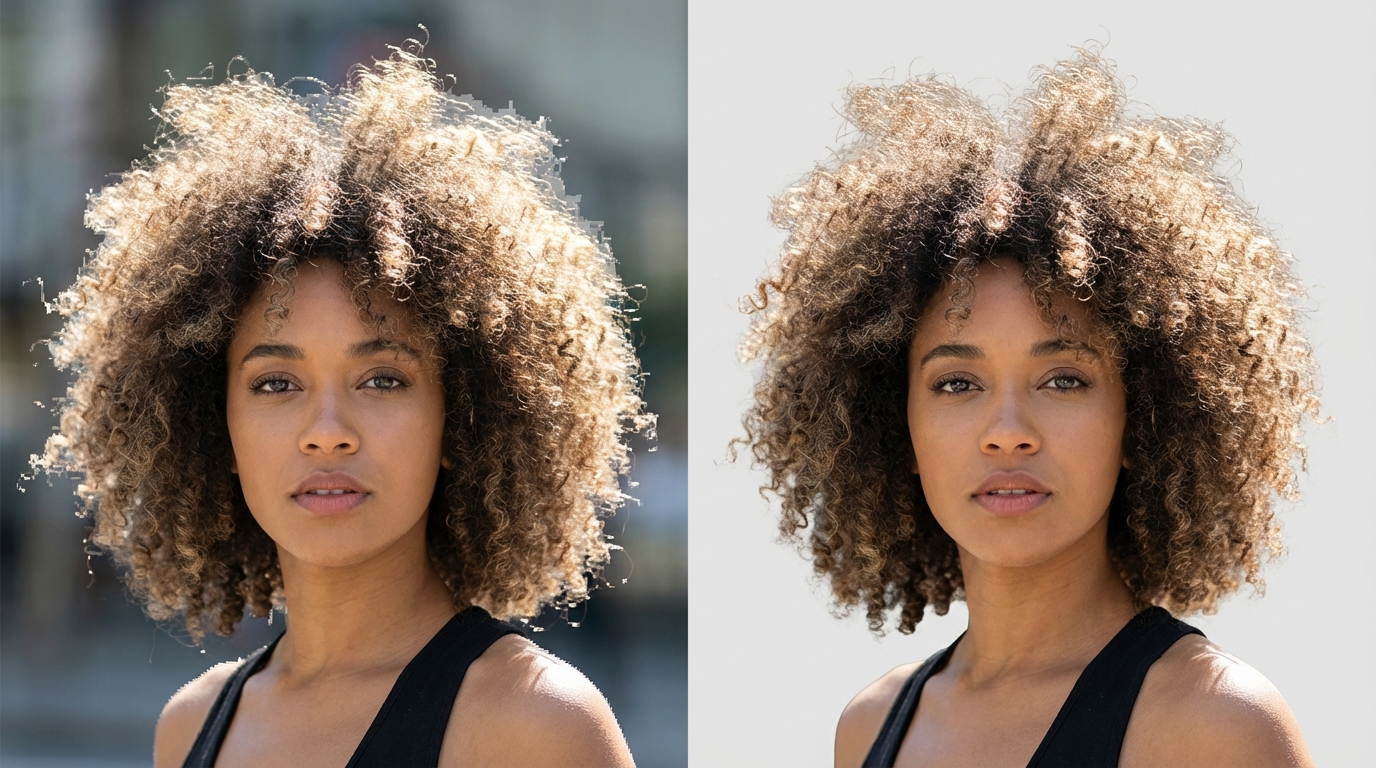
How to Remove Background Online Free with High Resolution
Prioritize tools that offer 'No Sign Up' convenience
Speed is everything when you are in a workflow. Tools that demand an email address before showing results are usually just lead-generation traps. I strongly suggest sticking to 'click-and-go' utilities that process images directly in the browser. If a tool forces a login, it is a red flag that the 'free' aspect is limited to a single low-quality trial.
Verifying 'No Watermark' claims before processing: Before you spend time fine-tuning, do a quick test run with a random image. If the export comes out clean and at the original size, you have found a winner. If not, move on immediately to avoid frustration.
Optimizing Your Cutouts for Social Media and E-commerce
Enhancing edges and resolution after background removal
Even a clean cutout can look 'fake' when placed on a new background. The edges often lack the natural depth needed for a professional look. If your free tool leaves the image looking a bit thin or low-res, you need to post-process. I have seen many creators fail because they forget to match the lighting of the new background to the subject.
Applying aesthetic filters for an 'Instagram-ready' look: To get that professional look, use an enhancer to smooth out the transition between the subject and the new backdrop. Using Koinavi is a smart way to ensure your final export maintains its HD integrity while looking naturally integrated into your design. KoiNaviをダウンロード

Quick Checklist for Perfect Background Removal
Ensuring high contrast between subject and background
The easiest way to fail is by uploading a 'busy' photo. If your subject's color is too similar to the background, the AI will get confused and delete parts of your subject. For the best results, ensure there is a clear visual distinction before you even start the removal process.
Final steps for a professional transparent PNG: Always save your file as a PNG-24 to preserve transparency. Check the corners of your image for 'ghost pixels'—small leftovers from the background that can ruin a clean web design.
👉 在线免费生成画像生成ページへ移動 👉 在线免费生成テキスト返信ページへ移動